 NounDesk
Find and manage devices
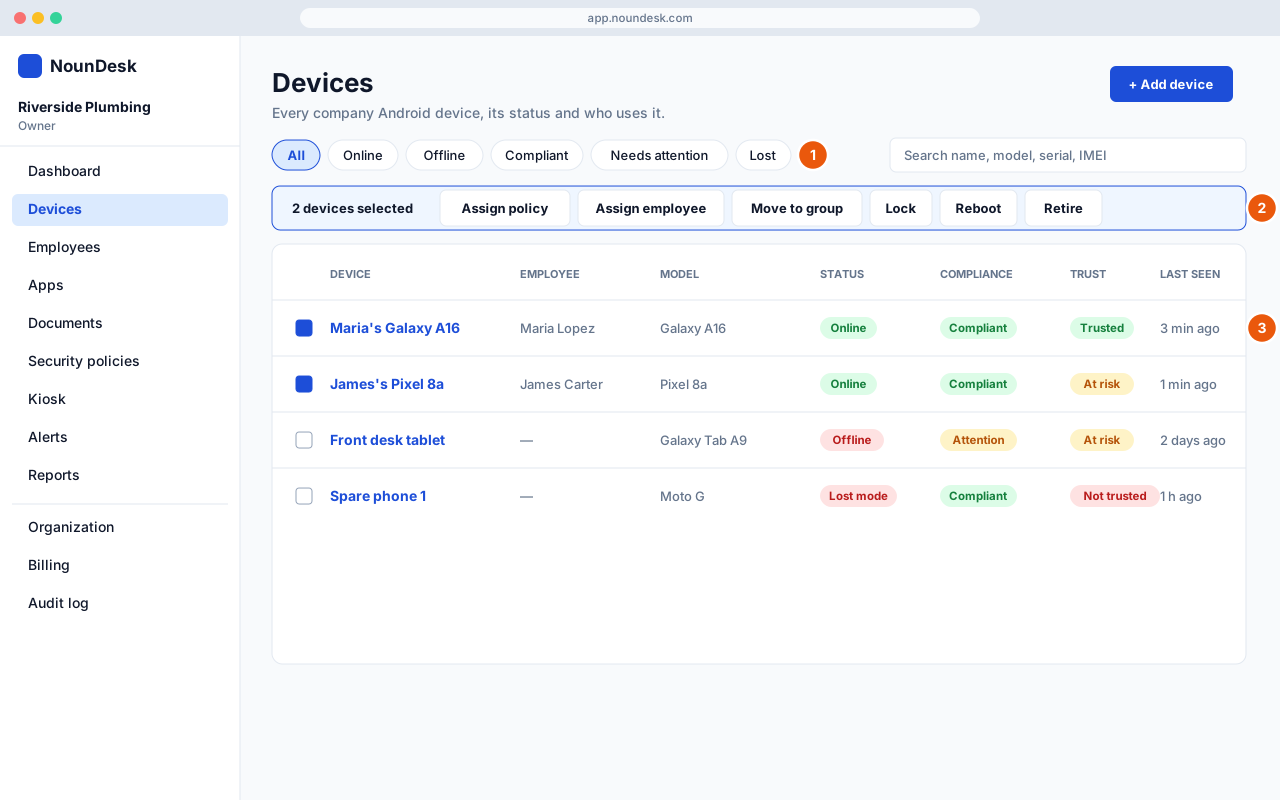
Who: all roles can view. Changes need Owner, Admin or Operator.
- Filter and search. Use the chips (All, Online, Offline, Compliant, Needs attention, Lost, Waiting for device, Retired) or search by name, model, serial or IMEI. Filters narrows by group, employee, policy, manufacturer or Android version.
- Act on several devices at once. Tick the devices, then choose Assign policy, Assign employee, Move to group, Lock, Reboot or Retire from the bar that appears. Every bulk action asks you to type the number of selected devices to confirm. Bulk erase is deliberately not offered.
- Read the columns. Status, compliance and trust are separate. Trust is explained in Device trust.
On a device page you can rename the device (pencil icon), assign an employee (Assign / Change) and move it to a group. The tabs are Overview, Apps, Security, Activity, Policy and Hardware. On the Policy tab, Change policy → Apply gives the device a different policy (Owner or Admin only, as is bulk Assign policy).